 ROLZ
ROLZ
Character Sheet
Your Character
Before you start:
- Click on the settings icon (which looks like a cog wheel) and set "My Character" to your character name.
- Go to the room's wiki and create a new page with the same name as your character.
Basic Character Sheet
You can then use the wiki page you created as your character sheet. Besides putting all kinds of text information onto that page, you can also use it to track your character's stats and you can set up buttons which you can click during play in order to trigger dice rolls.
Stats
Editable Fields
To add stat fields to your character sheet, you can use the [field NAME] code, where NAME is the name of the field.
- For example, the code [field STR] would track your STR attribute.
It would be an input field that looks like this: - If you want your field to carry an informative label, add it in quotes before the field name: [field "Smash!" STR] Smash!
- You can declare a default value for a field: [field "Smash!" STR default=3] Smash!
- [field "Strength" STR t=5e] stores a D&D 5e ability score and shows its modifier.
- [field "Weapon Skill" WS t=wh] stores a WFRP-style starting value and advances, and exposes the current percentile value.
- [field "Advantage" Adv t=adv] shows +/- controls and defaults to the variable name Adv if no name is given.
- [button #d20+!STR] which looks like this:
Static Fields
If you don't want a stat field to be editable, you can use the const code to define a value that can only be edited by changing the wiki page itself.
- For example:
[const STR +3] will be shown asSTR: +3
Pool Fields
Some roleplaying systems use dice pools, meaning every character has properties that can be used up over time and then replenished. A pool field stores three variables: NAME_full for the full pool, NAME_cur for currently available points, and NAME for points currently in use. Use the ! prefix to reference them in dice codes, for example !ini_cur or !STR_cur.
- For example, you can define an initiative pool like this:
[poolfield "Initiative" ini]Initiative - If you define [poolfield "Strength" STR], the available/current value is referenced as !STR_cur. The full value is !STR_full, and the in-use value is !STR.
Skill Lists
You can add a skill list to your character sheet by using the code [skills], it will look like this:
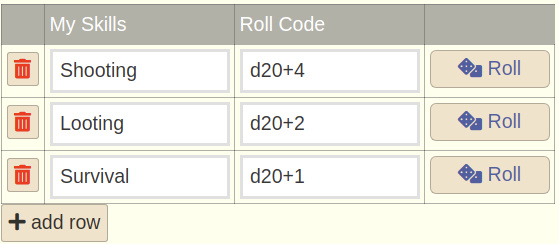 Several "skill lists" per character sheet are possible if you name them differently. For example, you can use [skills myskills] and [skills myattacks] to have two different lists for skills and attacks.
To give your skill list a custom title, use quotes to declare the title in the code: [skills "My Skills" myskills]
Skill rows are displayed alphabetically by row name. New blank rows stay at the bottom until you name them.
In a skill row's roll-code column, placeholders are replaced before the roll is sent: @0 is the row name, @1 is the visible Value/Bonus column, @2 is the Roll column, and @3 is Notes. For example, D20+!STR+@1 adds your STR field and that row's bonus.
Several "skill lists" per character sheet are possible if you name them differently. For example, you can use [skills myskills] and [skills myattacks] to have two different lists for skills and attacks.
To give your skill list a custom title, use quotes to declare the title in the code: [skills "My Skills" myskills]
Skill rows are displayed alphabetically by row name. New blank rows stay at the bottom until you name them.
In a skill row's roll-code column, placeholders are replaced before the roll is sent: @0 is the row name, @1 is the visible Value/Bonus column, @2 is the Roll column, and @3 is Notes. For example, D20+!STR+@1 adds your STR field and that row's bonus.
Referencing Stats from Dice Rolls
Use the ! prefix to read character-sheet fields in dice codes. If your character page has [field STR], then !STR reads that field.
- Example:
- a field or const on the current wiki page, when the roll comes from a wiki page
- a lookup list named STR
- a page.field value from a specific wiki page
- a field or const on your current character page
- a field or const on the dicebar page
- a field or const on the room start page
- a matching field or const on another room wiki page
Defining Command Buttons
By adding command buttons to your character sheet, you can trigger your most used rolls just by clicking on them. Use the [button #CODE] code to define a button that triggers a dice code CODE. For example:
- [button #d20] looks like this:
and triggers a D20 - [button #d20+5 #axe attack] looks like this:
and triggers a D20+5 - [button #d20+!STR #strength check] looks like this:
and triggers a D20+!STR roll using the STR stat defined on your character sheet. - by default, buttons have the same label as the comment they contain. If you want to show a different label, put a quoted text in front of the dice code like this:
[button "this is my label" #d20 #roll d20]